

10 Jul How to Make Your Alarm.com Wi-Fi Camera More Resistant to Wi-Fi Jamming
Wireless security cameras have become one of the most popular ways to protect homes and businesses. Compared to traditional wired cameras, Wi-Fi cameras are often easier to install, require less cabling, and can be placed in locations where running wires would be difficult or expensive. They also offer high-definition video, motion detection, two-way audio on many models, and remote access through a smartphone or computer, allowing property owners to check on their homes or businesses from virtually anywhere.
Because of these advantages, Wi-Fi cameras have become an essential part of modern security systems. They help deter criminals, provide valuable evidence when incidents occur, and give homeowners and business owners greater peace of mind by keeping them connected to their property 24/7.
However, like any device that relies on a wireless network, Wi-Fi cameras also have limitations. They depend on a stable Wi-Fi connection to stream live video, send real-time alerts, and upload recordings to the cloud. This means they can be affected by internet outages, router failures, or intentional wireless interference, commonly known as Wi-Fi jamming.
While no wireless camera can be completely immune to a determined jammer, one of the most effective ways to protect your video evidence if your Wi-Fi connection is disrupted is to install a microSD card in your compatible Alarm.com camera. By enabling Alarm.com’s Onboard Recording feature, your camera can continue recording locally even when it temporarily loses its network connection, helping ensure that important footage is preserved when it matters most.
What Is Wi-Fi Jamming?
Wi-Fi jamming occurs when someone intentionally broadcasts radio interference to disrupt wireless communications. If successful, it can temporarily prevent a Wi-Fi camera from communicating with your network, meaning you may lose:
- Live video streaming
- Instant event notifications
- Cloud uploads during the interruption
Although Wi-Fi jamming is relatively uncommon, it’s something security-conscious homeowners and business owners should understand.
The Best Defense: Local Recording with a microSD Card
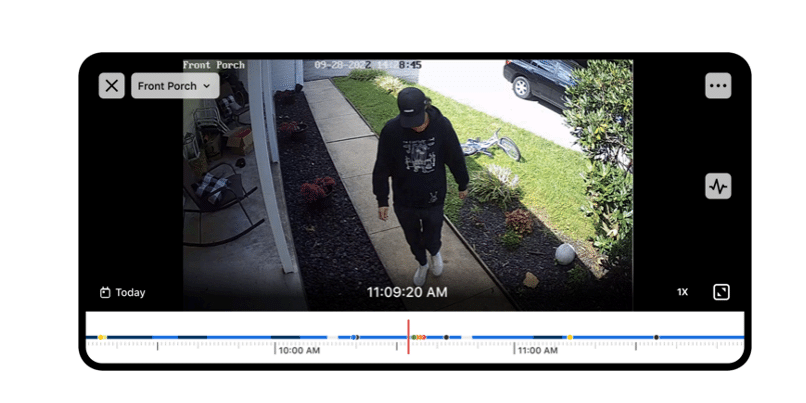
One of the most valuable features available on many Alarm.com Wi-Fi cameras is local recording using a microSD card.
Normally, your Alarm.com camera records events to the cloud. However, if the camera temporarily loses its Wi-Fi connection due to interference or an internet outage, cloud uploads can’t happen until the connection returns.
A microSD card gives your camera another place to save important footage.
Instead of losing the recording entirely, the camera stores the video locally on the SD card while the network is unavailable.
This means you still have access to valuable evidence that may otherwise have been lost.
Why Local Recording Matters
Adding a microSD card provides several important benefits:
- Preserves Critical Evidence: If someone attempts to interfere with your Wi-Fi, the camera can continue recording directly to the SD card, helping preserve footage of suspicious activity.
- Protection During Internet Outages: Not every interruption is intentional. Storms, ISP outages, router failures, or accidental disconnections can also interrupt cloud recording. Local storage keeps recording even when the internet is unavailable.
- Continuous Peace of Mind: Knowing your camera has a backup recording option gives you greater confidence that important moments won’t be missed.
Does an SD Card Make My Camera Jam-Proof?
A microSD card does NOT stop Wi-Fi jamming or prevent wireless interference.
Instead, it significantly reduces the impact of a disrupted Wi-Fi connection by ensuring that video footage can still be recorded locally on the camera.
Think of it as a safety net that protects your evidence even when communication with the cloud is temporarily interrupted.
Is Your Alarm.com Camera Compatible?
 ‘
‘
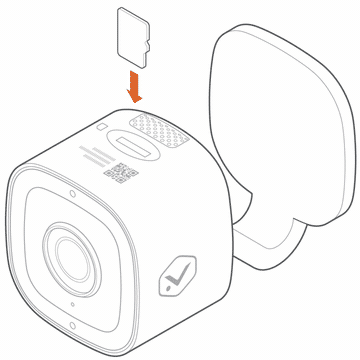
Adding a microSD card to a compatible Alarm.com camera does much more than simply create a backup of your footage. It unlocks Alarm.com’s Onboard Recording feature, providing continuous local recording with powerful playback capabilities and additional protection against network interruptions.
Many of the latest Alarm.com camera models now support microSD cards up to 1.5 TB, giving you significantly more storage for continuous recording before older footage begins rolling over. This large capacity is ideal for homeowners and businesses that want to retain more video history without relying solely on cloud storage. (Support varies by camera model and firmware version.)
Compatible video devices:
- Alarm.com Indoor 1080P Wi-Fi Camera
- Alarm.com 1080p HDR Indoor Wi-Fi Camera
- Alarm.com 1080P Indoor Wi-Fi Camera
- Alarm.com 1080p Outdoor Wi-Fi Camera
- Alarm.com Outdoor Wi-Fi Camera with Two-Way Audio
- Alarm.com 4MP Outdoor Spotlight Camera
- Alarm.com Pro 1080P PoE Audio Bullet Camera
- Alarm.com Pro 1080P Poe Dome Camera
- Alarm.com 1080P Pro PoE Varifocal Dome Camera
- Alarm.com Pro 4MP Poe Varifocal Turret Camera
- Alarm.com Pro 4MP Poe Varifocal Bullet Camera
- Alarm.com Wifi Flood Light Camera
- Alarm.com Fusion Premium Doorbell Camera
- Alarm.com 4MP Indoor WiFi Spotlight Camera
- Alarm.com Prism 8MP PoE Varifocal Bullet Camera
- Alarm.com Prism 8MP PoE Varifocal Dome Camera
- Alarm.com Prism 8MP PoE Dome Camera
- Alarm.com Prism 5MP PoE Dome
- Alarm.com Video Doorbell
Protect More Than Just Your Connection
Our security system is only as valuable as the evidence it captures.
Adding a microSD card to your compatible Alarm.com Wi-Fi camera is one of the simplest and most effective ways to ensure important footage is preserved—even if your internet connection or Wi-Fi is temporarily interrupted.
While no wireless system can claim to be completely immune to Wi-Fi jamming, local recording provides an extra layer of protection that can make all the difference when it matters most.
If you’d like to learn more about compatible Alarm.com cameras, local recording, or upgrading your security system, contact our team today. We’ll help you build a smarter, more resilient security solution for your home or business.
No Comments