


24 Jul Can Alarm.com Cameras Capture License Plates?
Introduction
Have you ever wondered if your Alarm.com camera can help identify a suspicious vehicle in your driveway? Many homeowners and small business owners want to know: Can Alarm.com cameras read license plates? Whether you’re trying to monitor your driveway, keep track of vehicles entering your property, track vehicles in your business parking lot, or enhance your overall security, capturing license plate details can be crucial. But not all cameras are built for this purpose.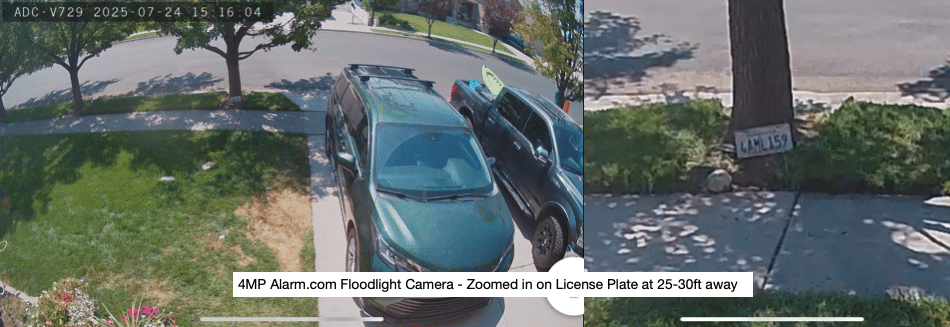
The Short Answer
Yes, Alarm.com cameras can see license plates under the right conditions—but they’re not dedicated license plate recognition (LPR) cameras. While most Alarm.com cameras aren’t purpose-built license plate readers (LPR), some of their cameras can absolutely capture license plates under the right conditions. (See Alarm.com Floodlight photo above where it can easily read the license plate at the base of the tree when zoomed in)
Why It’s Tricky
Capturing a license plate is more challenging than taking a regular video of a car. Factors that make it difficult include:’
- Speed of the vehicle – Fast-moving vehicles often appear blurred on standard security footage. For the best results, vehicles should be stationary or moving slowly, such as when entering a driveway or pulling into a parking space.
- Lighting conditions – Bright headlights at night, harsh sunlight, or deep shadows during the day can wash out or obscure plate numbers. Without the right lighting balance, even high-resolution footage may be unclear.
- Camera resolution and lens type – Cameras with low resolution or fixed wide-angle lenses may not capture the detail needed for license plates. A zoom-capable lens with at least 4MP resolution is recommended for clarity.
- Mounting location and angle – If the camera is mounted too high, too far, or at the wrong angle, it might miss the plate entirely or capture it at an unreadable tilt. A direct, level view of the plate at a reasonable distance is key.
Suppose you’re trying to catch license plates on fast-moving traffic from across the street. In that case, you’ll need a specialized LPR camera with features like shutter control, optical zoom beyond 25x, and dedicated software.

Best Practices for Capturing Plates with Alarm.com Cameras
You basically have two options with ADC Cameras. 2MP or 4MP Cameras.
1. Choose the Right Camera Model
- Wifi or PoE 1080P Camera (can see license plates around 10-15ft away, but further than that you will have a hard time making out the license plate numbers)
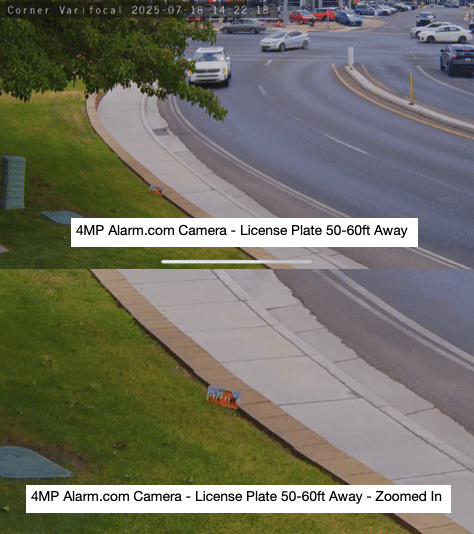
- Varifocal 4MP Cameras – These can see license plates pretty well around 50-60ft away. If you want to see further than that or while vehicles are moving you will want a special LPR Camera.
2. Optimize Placement
- Mount the camera at about license plate height (or slightly above).
- Position it where vehicles naturally slow down—driveway entrances, gates, or parking spots.
3. Adjust Camera Settings
- Zoom in lens if varifocal on the area of concern
- Enable WDR (Wide Dynamic Range) to balance lighting.
- Adjust exposure settings to reduce glare from headlights at night.
4. Use Dedicated Lighting
- Add IR (infrared) or visible lighting to ensure plates are visible even in complete darkness.
Who Is This For?
For Homeowners: If you’re monitoring a driveway, gated entrance, or private road, a properly placed 2MP or 4MP Alarm.com camera can capture plates of parked or slow-moving vehicles. This setup is ideal for identifying delivery drivers, guests, or unfamiliar cars entering your property.
For Small Businesses: If you’re watching over a parking lot, commercial gate, or loading zone, the 4MP varifocal camera gives you better range and clarity. It’s useful for tracking customer vehicles, employee entry, or reviewing incidents in high-traffic areas.
What Alarm.com Cameras Can’t Do
- They don’t perform automatic license plate recognition (ALPR)—they can see plate numbers, but they won’t convert them into searchable text.
- They may not capture plates on fast-moving vehicles, especially at night or from far away.
When to Consider a Dedicated LPR Camera
If you need reliable plate captures for all conditions—such as for a business with high traffic or a gated community—you might consider integrating a dedicated LPR camera alongside your Alarm.com system. Many LPR cameras can feed into an NVR (Network Video Recorder) while still working with your Alarm.com setup for overall property monitoring.
Conclusion
Alarm.com cameras can record license plates when set up correctly, but they’re not a guaranteed LPR solution. For most homeowners and small businesses, they’re enough to capture plates of vehicles that are parked or that move very slowly on your property.
If license plate capture is a top priority, contact us about pairing your Alarm.com system with a dedicated LPR camera.
No Comments